SWITCH
| Genre: | Action |
| Type: | Base Game |
| Game Size: | 1.7 GB |
| Format: | NSP |
| Version: | 1.26 |
| Serial ID: | 0100F2C0115B6000 |
| Languages: | English, Japanese, French, German |
| Required Firmware: | 16.0.3+ |
| Release Date: | June 21, 2018 |
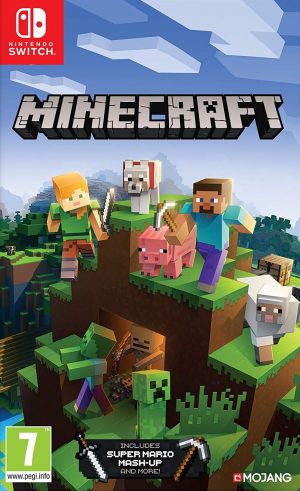
Minecraft NSP is an open-world game about placing blocks, building things, and exploring infinite, randomly generated worlds. From the simplest house to the grandest castle, players can build anything they can imagine. Developed by Mojang Studios, it is one of the best-selling games in the history of the gaming industry.
Players can also share their adventure with friends through split-screen multiplayer or online multiplayer.
In June 2026, Nintendo and Mojang officially announced a dedicated version of Minecraft for the Nintendo Switch 2, scheduled for release later that year. It’s worth noting that the game has been playable on the console since its launch, thanks to backward compatibility, but this new version is specifically designed to take full advantage of the new console’s capabilities.
To coincide with the launch of the new version, the companies also announced an update to the popular Super Mario Mash-Up pack, exclusive to Nintendo consoles, which will also benefit from the enhanced Vibrant Visuals graphics. This pack allows players to explore iconic locations from the Mario universe, such as Princess Peach Castle and Delfino Plaza, complete with sounds and characters inspired by the Super Mario Bros. series. Latest Updates: Chaos Cubed Update
In June 2026, Mojang released a new update called Chaos Cubed, which added exciting content to the game, most notably:
A new creature called the Sulfur Cube: A strange creature that feeds on various cubes and can change its shape depending on the type of block it eats.
Sulfur Caves: A new underground area filled with new blocks that can be mined.
Sulfur Pools in the upper world can be identified by the presence of sulfur and cinnabar blocks, as well as the toxic gas they emit.
The update also included several fixes, including a fix for an issue that caused the frame rate to drop or freeze at 30 frames per second during gameplay.
Also Read !!! Astral Chain NSP ROM
Start by gathering wood and stone
Build a shelter before nightfall
Don’t neglect farming and raising animals
Explore other dimensions cautiously
Try out different game modes


1. Copy the NSP or XCI file to your Switch SD Card.
2. Open your preferred installer (DBI, Awoo Installer, or Tinfoil) on custom firmware (Atmosphère).
3. Select "Install from SD Card" or USB/Network option and confirm installation.
4. Ensure your custom firmware is updated to required firmware (16.0.3+) or higher.
If you experience a black screen on boot:
1. Update your Sigpatches to the latest version compatible with your Atmosphère release.
2. Verify that your system firmware meets the required minimum (16.0.3+).
3. Re-download the game NSP file to rule out file corruption during transfer.
User Comments & Reviews