SWITCH
| Genre: | Action |
| Type: | Base Game |
| Game Size: | 3.9 GB |
| Format: | NSP |
| Version: | 1.0.3 |
| Serial ID: | 0100F2C0115B6000 |
| Languages: | English, Japanese, French, German |
| Required Firmware: | 16.0.3+ |
| Release Date: | October 19, 2018 |
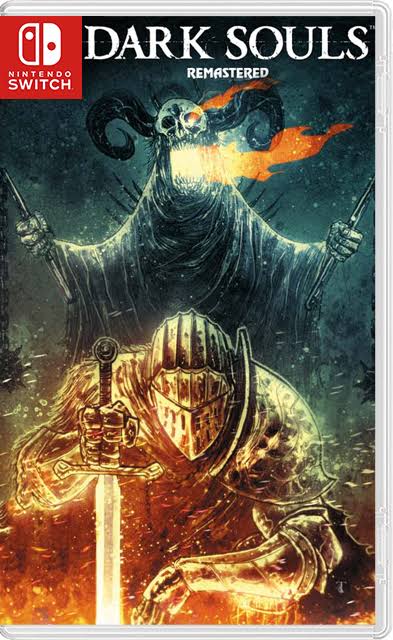
Dark Souls Remastered NSP is a remastered version of the original 2011 Dark Souls game, developed by the Japanese studio FromSoftware under the direction of renowned designer Hidetaka Miyazaki. This game is considered a cornerstone of the “Souls-like” genre, thanks to its challenging combat system and intricate, interconnected world design. The remastered version was officially released for the Nintendo Switch on October 19, 2018.
The game takes place in the world of Lordran, a world slowly dying as the “Fire One” that fueled civilization and life within it is extinguished. The player assumes the role of the “Undead,” who embarks on a perilous journey to find a way to rekindle the flame or accept the fate of the dark world. This journey involves exploring the ruins of castles, cathedrals, and abandoned sacred sites, and encountering mythical creatures and bosses. The game’s narrative employs an indirect style, with most of the story told through descriptions of weapons and items, and scattered character dialogues, leaving ample room for the player to interpret events.
Dark Souls Remastered combines core elements that later defined the entire series:
Also Read !!! Sonic Mania NSP ROM
The Nintendo Switch version of the game features:
Dark Souls Remastered on Nintendo Switch offers a fantastic opportunity to experience one of the most important games in the industry’s history on the go, while fully preserving the core challenge and depth that made the series legendary. For the complete experience, it is always recommended to purchase the game from official sources.


1. Copy the NSP or XCI file to your Switch SD Card.
2. Open your preferred installer (DBI, Awoo Installer, or Tinfoil) on custom firmware (Atmosphère).
3. Select "Install from SD Card" or USB/Network option and confirm installation.
4. Ensure your custom firmware is updated to required firmware (16.0.3+) or higher.
If you experience a black screen on boot:
1. Update your Sigpatches to the latest version compatible with your Atmosphère release.
2. Verify that your system firmware meets the required minimum (16.0.3+).
3. Re-download the game NSP file to rule out file corruption during transfer.
User Comments & Reviews